
ThemeWare® "Grid" CMS blocks
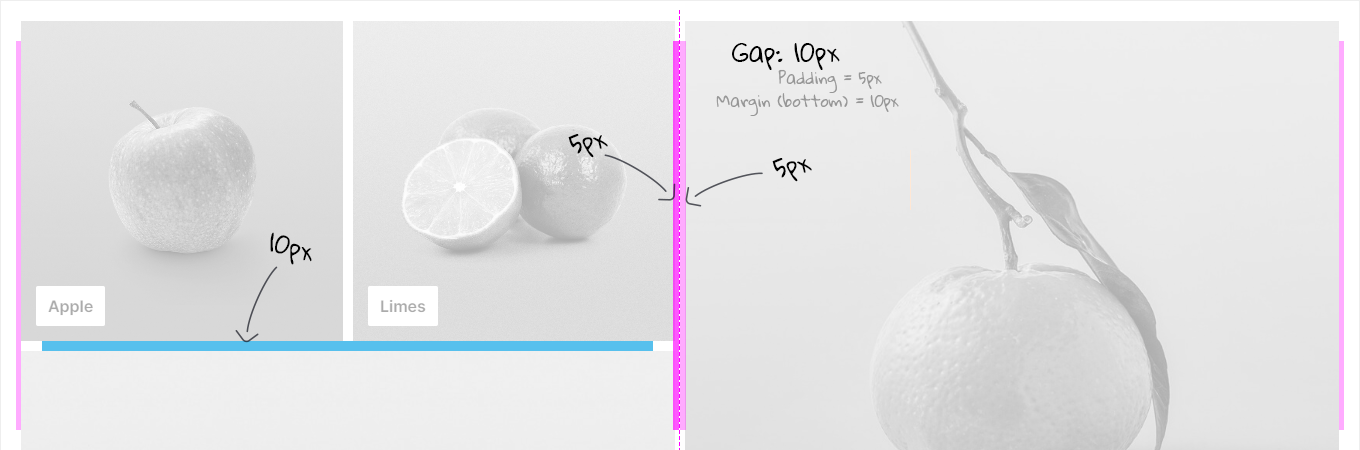
Elements in "Grid" CMS blocks have a fixed spacing of 40px in Shopware 6. ThemeWare® provides you with various CSS classes to change this spacing.
With ThemeWare® 3.2 we have added the following CSS gap classes for ThemeWare® "Grid" CMS blocks as well as the standard "Grid" CMS blocks from Shopware.
CSS classes
| Class | Block/Section | Description |
|---|---|---|
| twt-cms-grid-gap-0 | Block | Sets the gap in CMS blocks to 0 pixels. |
| twt-cms-grid-gap-5 | Block | Sets the gap in CMS blocks to 5 pixels. |
| twt-cms-grid-gap-10 | Block | Sets the gap in CMS blocks to 10 pixels. |
| twt-cms-grid-gap-15 | Block | Sets the gap in CMS blocks to 15 pixels. |
| twt-cms-grid-gap-20 | Block | Sets the gap in CMS blocks to 20 pixels. |
| twt-cms-grid-gap-25 | Block | Sets the gap in CMS blocks to 25 pixels. |
| twt-cms-grid-gap-30 | Block | Sets the gap in CMS blocks to 30 pixels. |
| twt-cms-grid-gap-35 | Block | Sets the gap in CMS blocks to 35 pixels. |
| twt-cms-grid-gap-40 | Block | Sets the gap in CMS blocks to 40 pixels. |
| twt-cms-grid-gap-45 | Block | Sets the gap in CMS blocks to 45 pixels. |
| twt-cms-grid-gap-50 | Block | Sets the gap in CMS blocks to 50 pixels. |
Note: How to insert the CSS classes please find in the article ThemeWare® CSS classes for Shopping Experiences.
Details
ThemeWare® "Columns" CMS blocks
The new CSS "Gap" classes also work in the "Columns" blocks of ThemeWare®.
Details

Note: If you want to adjust the spacing in mobile viewports separately, use the separate CSS column spacing classes: Adjusting column spacings in CMS blocks