
- Open the administration of your shop
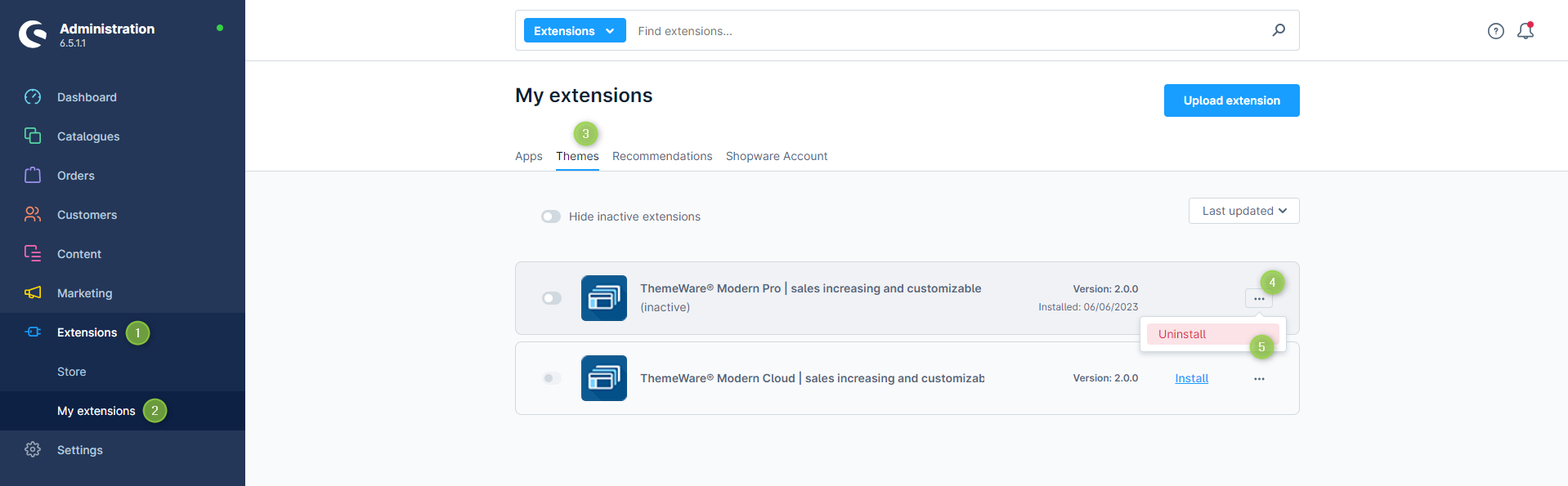
- Switch via the main navigation to the "Extension Management" (1) (2) ("Extensions" => "My Extensions")
- Switch to the tab "Themes" (3)
- Click on the
 Context-Button (4) next to the theme to open the context menu and click on "Uninstall" (5)
- :information_source: Note: Deactivate the theme before updating, and once it’s deactivated, clear the Shopware cache. Deactivating ThemeWare®
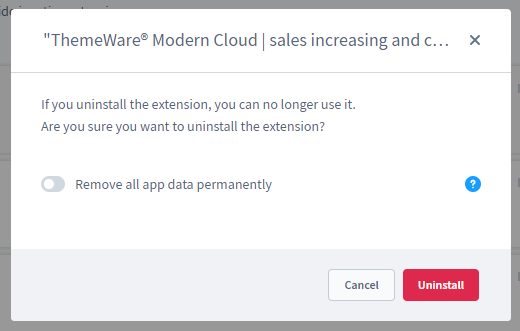
- In the following pop-up you have to confirm the uninstallation with the "Uninstall" button once again
- Clear the entire Shopware cache and reload the administration
ThemeWare® has now been uninstalled.
Important: Unlicensed extensions must be completely deleted and may not appear in the plugin manager of your shop!
Screenshots
Option: Remove all App data permanently
When uninstalling ThemeWare® the option "Remove all app data permanently" can be used. This deletes all ThemeWare® data such as the theme configuration, ThemeWare® duplicates and the ThemeWare® Custom Fields.
Therefore, if you want to remove ThemeWare® residue-free, use this option.
Tip: If you are not sure whether you want to continue using ThemeWare® after all, or if you are using the uninstallation for debugging, save the data to have it available for a later installation.
If this option is not being used, all the data will remain in the system and can be used again as soon as you reinstall ThemeWare®.
Further information
Note: It makes sene, but is not necessary, to deactivate extensions before uninstalling them.
Tip: Uninstallation can be used to correct errors, in case e.g. write permissions were set incorrectly on the server, for example. In this case, you should not use the option "Remove all App data permanently" !