
If you have installed an extension, it is basically "ready for use". In order to be able to use the extension, it must be activated.
Activating ThemeWare®
- Open the administration of your shop
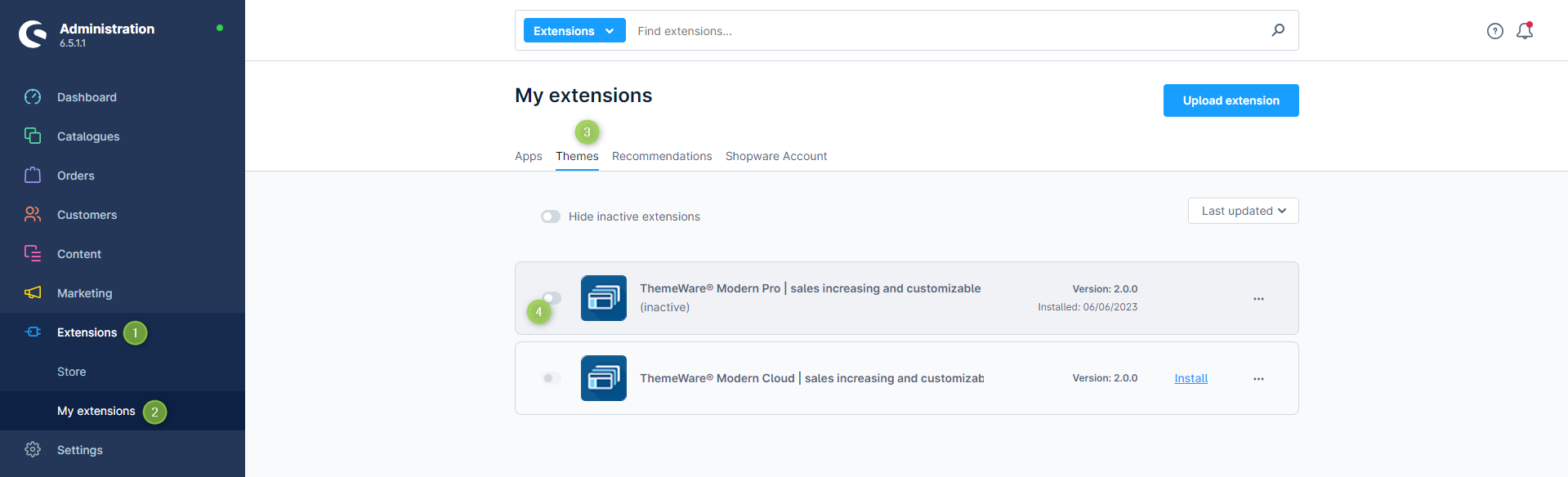
- Switch via the main navigation to "Extension Management" (1) (2) ("Extensions" => "My Extensions")
- Switch to the "Themes" tab (3)
- Activate ThemeWare® via the
 switch button (4) on the left of the ThemeWare® logo
ThemeWare® has now been activated.
In the next article you will learn how to assign ThemeWare®.
Screenshots
Further information
If you have further questions or any problems, you can find more information in our detailed tutorial: Activating ThemeWare®