
- Open the administration of your shop
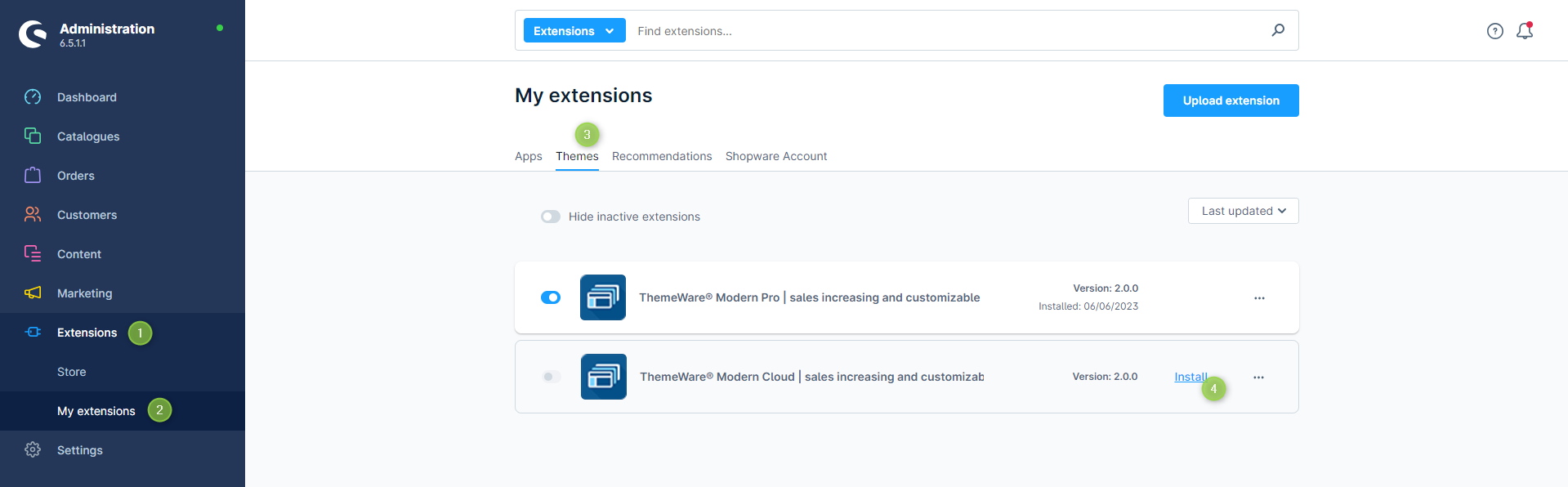
- Switch via the main navigation to the "Extension Management" (1) (2) ("Extensions" => "My Extensions")
- Switch to the tab "Themes" (3)
- ThemeWare® is now being displayed in the overview
- Now install the extension via the option "Install". (5)
ThemeWare® has now been installed.
Tip: Activate ThemeWare® next: Activating ThemeWare®
Screenshots
Further information
Note: Your extensions will automatically appear in the extensions management of your shop if you have observed the following points:
- Register your store in your Shopware account: Setting up the shop in the Shopware Account
- Connect your Shopware account to the shop administration: Linking up the Shopware Account with the shop
- Log in with your Shopware account in the administration: Registering the Shopware Account in the administration