
The theme configuration of ThemeWare® can be reached in two ways:
- Via Theme Management (recommended)
- Via the corresponding Sales channel
In the following we will show you both ways in detail.
1. Theme Management
- Open the administration of your shop
- Switch via the main navigation to "Theme Management" (1) (2) ("Content" => "Themes")
- Note: In the Shopware Cloud, you will find the "Themes" section directly in the main navigation.
- Now click on your ThemeWare® theme, to start editing(3)
- Save your changes after editing in order to transfer them to the storefront
Screenshots
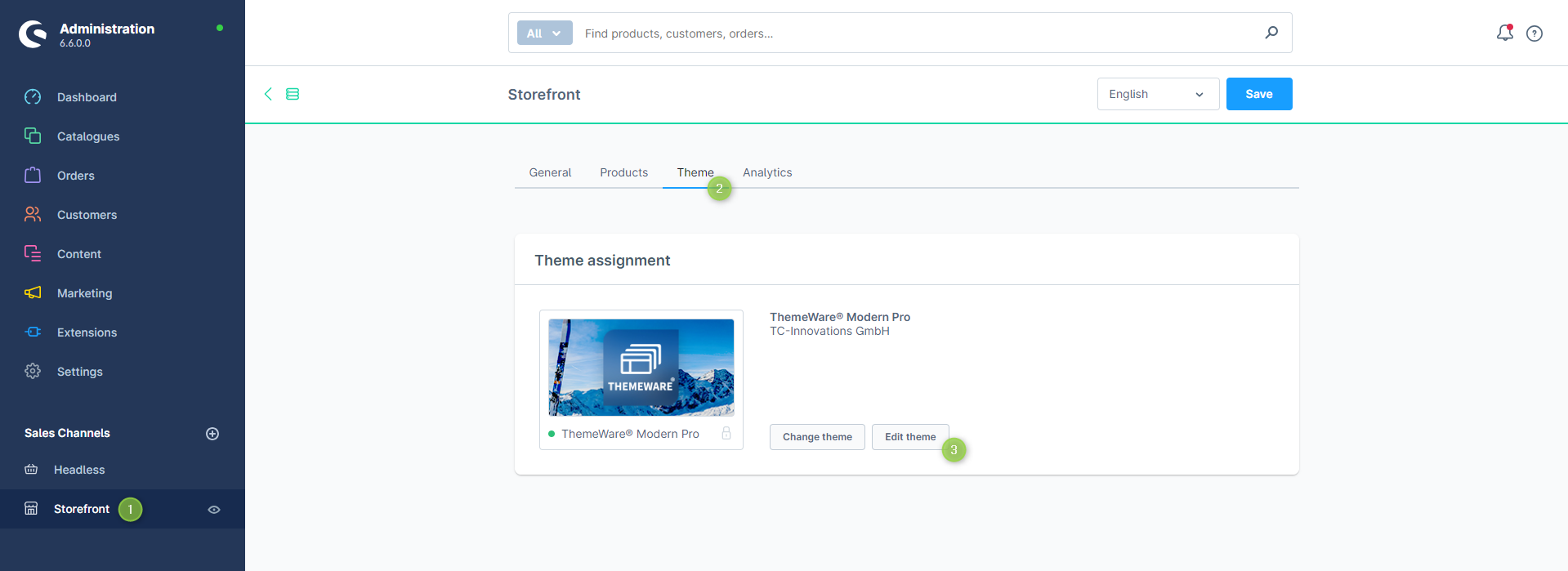
2. Sales channel
- Open the administration of your shop
- Switch via the main navigation to the sales channel of your storefront
 in the section "Sales Channels" (1)
 - Switch to the tab "Theme" (2)
- Now click on the button "Edit theme" in the section "Theme assignment" (3)
- Save your changes after editing so that they are transferred to the storefront
Screenshots
Further information
Note: If a change in the storefront does not have an effect, please update the storefront once with the following instructions: Refreshing the storefront