
If you have purchased a Shopware extension via the Shopware Store and you have registered your Shopware account in your shop, you can easily install it via the Extension Management.
Tip: Log in to your Shopware account in order to access purchased licences: Registering the Shopware Account in the administration
Installing ThemeWare®
- Open the administration of your shop
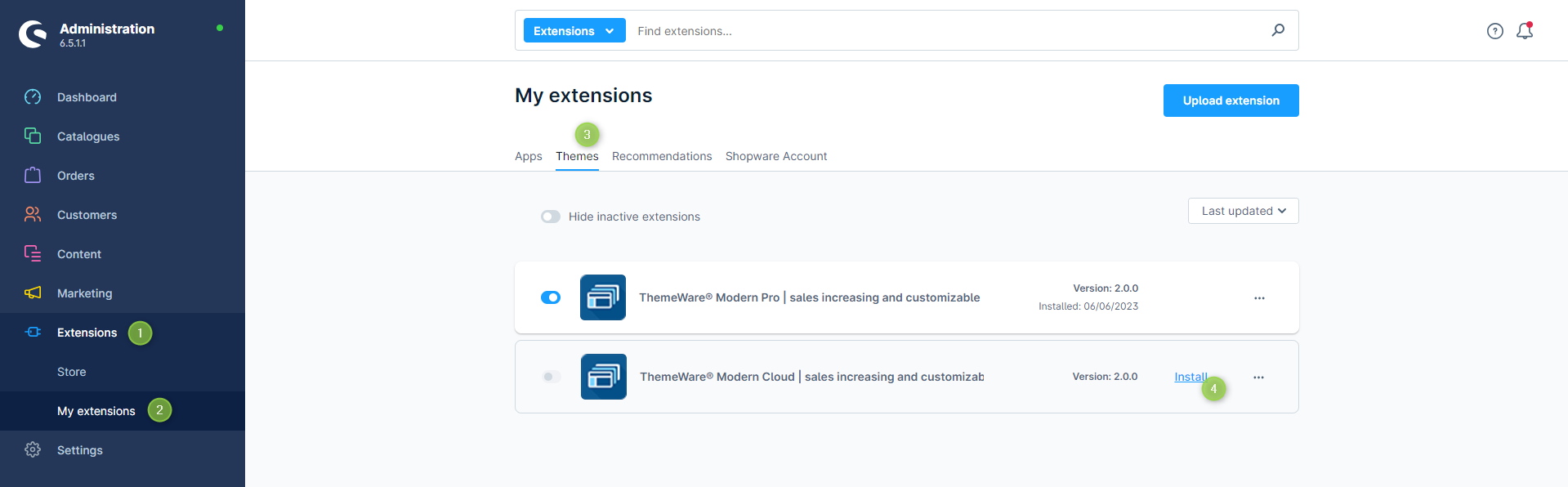
- Switch via the main navigation to the "Extension Management" (1) (2) ("Extensions" => "My Extensions")
- Switch to the tab "Themes" (3)
- ThemeWare® is now being displayed in the overview
- Now install the extension via the option "Install". (5)
ThemeWare® has now been installed.
In the next article you will learn how to activate ThemeWare®.
Screenshots
Further information
If you have further questions or any problems, you can find more information in our detailed tutorial: Installing ThemeWare®