
- Open the administration of your shop
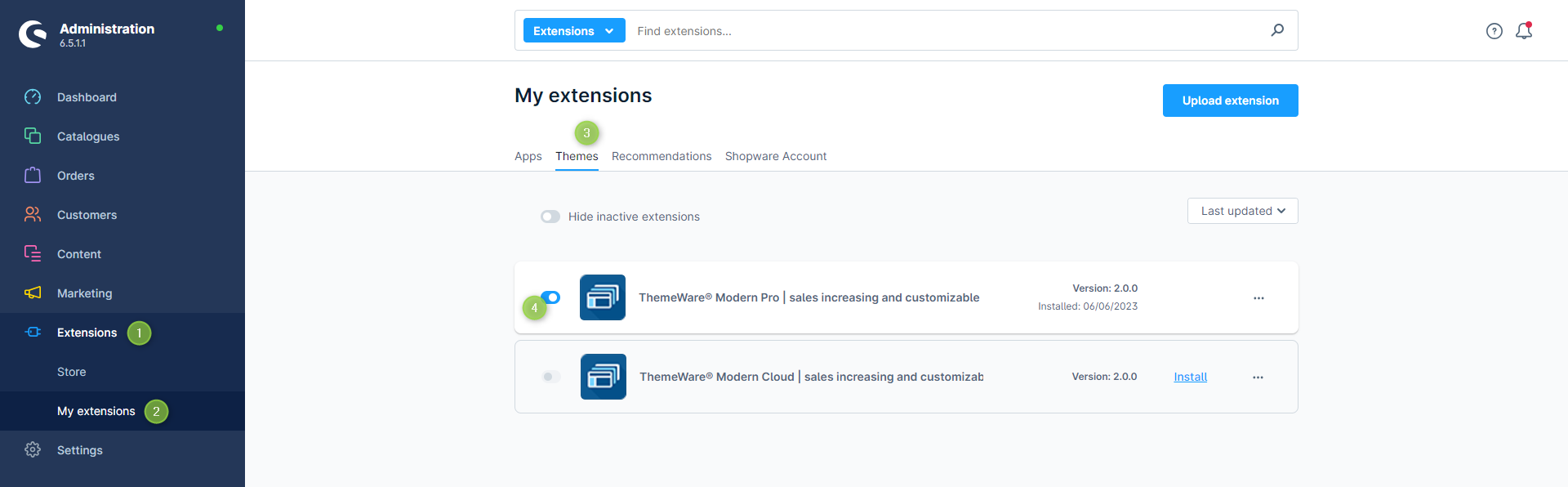
- Switch via the main navigation to the "Extension Management" (1) (2) ("Extensions" => "My Extensions")
- Switch to the tab "Themes" (3)
- Deactivate ThemeWare® via the
 switch button (4) on the left of the ThemeWare® logo
- :information_source: Note: To deactivate a theme, it must no longer be assigned to any Sales Channel!
- Clear the entire Shopware cache and reload the administration
ThemeWare® has now been deactivated.
Important: Unlicensed extensions must be completely deleted and may not appear in the plugin manager of your shop!
Screenshots
Further information
Note: In order to deactivate a theme, it must no longer be assigned to a sales channel!
Note: "Deactivating" extensions (plugins, apps or themes) does not delete any data.(Status: Shopware 6.5.6.0)
Tip: In case of representation errors in the storefront, it may help to deactivate extensions (plugins, apps or themes) once and then reactivate them.