
The delivery information shows the availability of a product in the product box, above the price: a status dot plus the delivery time maintained on the product.
Four states are covered:
- available (green)
- pre-order (yellow)
- ready for shipping in x days (yellow)
- currently not available (red)
Note: Products without a delivery time show nothing.
Configuration
Theme configuration
- Go to the "Listing pages" tab
- Expand the "Product box" block
- Scroll to the section "Delivery information"
- Enable the configuration "Show delivery information"
- Choose the desired appearance under "Layout type"
- Save your changes after editing
Options
- Show delivery information
- "don't show"
- "show"
- Layout type
- "inherit - like the product page": Uses the layout type of the product page (Tab "Product pages" => Block "Delivery information (in the buy box)" => Section "Basic configuration" => Layout type), so both surfaces stay in sync.
- "Text": A plain line with the status dot – the familiar Shopware look, but in the ThemeWare® group.
- "Label": The same line on a surface tinted in the status colour (green / yellow / red).
- "Badge": A rounded badge without the dot – inherits the corner style and font size of the product badges.
- "Chip": The dot sits in a tinted circle with the text next to it; hovering the product box grows the circle behind the text into a pill.
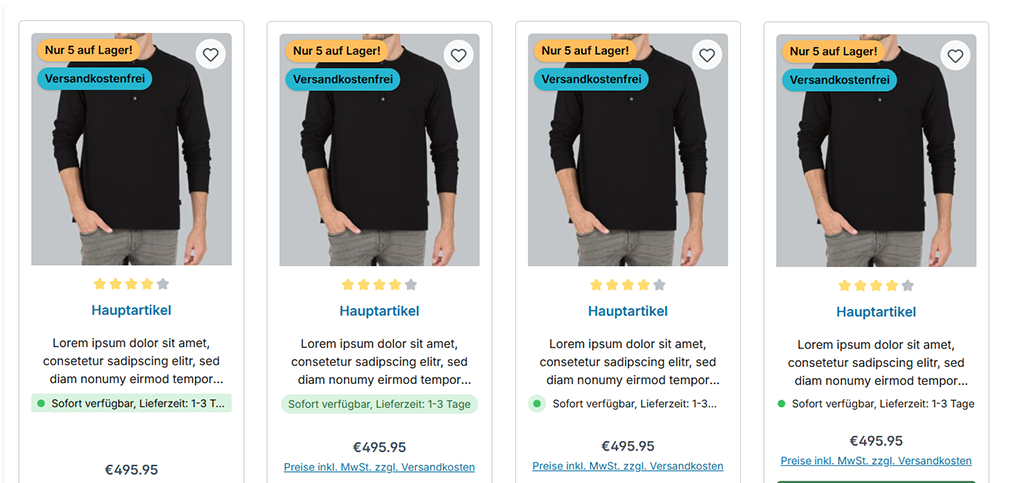
Label | Badge | Chip | Text
Summary
Theme configuration
- Tab "Listing pages" => Block "Product box" => Section "Delivery information" => Show delivery information
- Tab "Listing pages" => Block "Product box" => Section "Delivery information" => Layout type
Snippets
wishlist.deliveryTimeAvailablewishlist.deliveryShippingwishlist.deliveryTimeRestockwishlist.currentlyNotAvailable