
Note: This element and this article are work in progress.
The ThemeWare® CMS element "Custom code (HTML/CSS/JS)" is a CMS element with which you can add individual HTML, CSS and JS code to your Shopping Experience.
As customised code can create potentially harmful vulnerabilities, this element is aimed at experienced users or experts who are familiar with individual programming. If you are not absolutely sure what you are doing, use the HTML editor of any text element in Shopware 6. This editor will automatically clean up your customised code.
Beta: This feature is currently in beta and may change in a future release. – We'd love to hear your feedback.
Caution: This CMS element is intended for experts who are experienced in working with custom code. Please note that custom code can create potentially harmful vulnerabilities!
Important: This element is only available in the ThemeWare® Pro Edition.
Configure element
You can configure the ThemeWare® CMS element "Custom code (HTML/CSS/JS)" as follows:
- Click on the corresponding CMS block (1) to activate the "edit mode"
- Hover the mouse over the desired CMS element
- Click on the
 "gear" icon (2) to configure the CMS element
 - The "Element Settings" pop-up will open
- Make the desired changes
- Save your changes
You have now configured the CMS element.
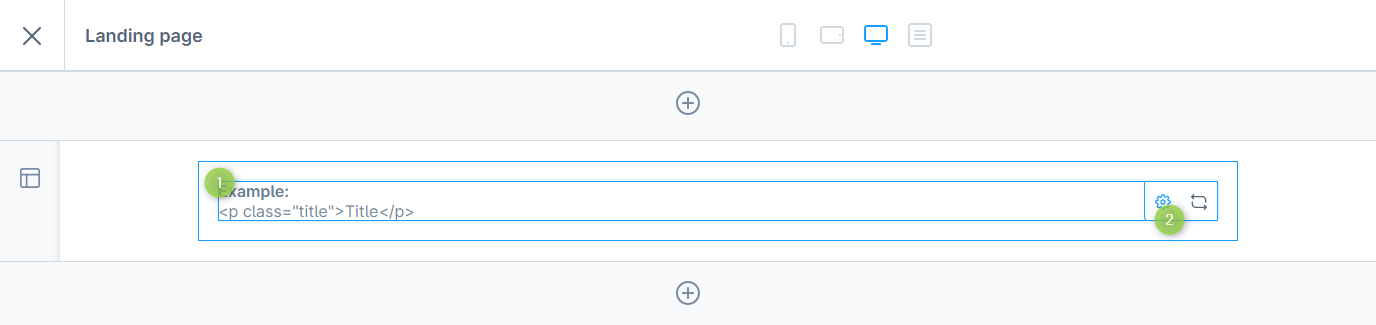
Configuring the ThemeWare® CMS element "Custom code (HTML/CSS/JS)"
Configuration
The configuration of the CMS element "Custom code" is quite self-explanatory. There are no mandatory fields.
HTML
In the tab "HTML" you add your custom HTML code.
Custom HTML code
In the section "Custom HTML code" you can add the desired HTML code.
Twig support
Using the "Allow Twig Variables" option, you can enable support for Twig variables. This allows you to use Twig variables (e.g.
{{ page.product.name }}or{{ category.name }}) directly within your HTML code.The variables used are automatically resolved and replaced with the corresponding content on product pages, category pages, and landing pages.
Caution: Potentially dangerous code is not sanitised and automatically removed from the editor!
CSS
In the tab "CSS" you can add your custom CSS code. Your CSS code is automatically wrapped in a style tag.
You can of course also integrate your CSS code via the "Custom HTML code" field. The "Custom CSS code" field is mainly for a better overview.
Custom CSS code
In the section "Custom CSS code" you can add the desired CSS code.
JavaScript
In the tab "JavaScript" you can add your custom JavaScript code. The JS code is automatically wrapped in a script tag.
You can of course also integrate your JS code via the "Custom HTML code" field. The "Custom JavaScript code" field is mainly for a better overview.
Custom JavaScript code
In the section "Custom JavaScript code" you can add the desired JavaScript code.
Advanced
You can select each HTML element of our CMS elements using the appropriate CSS classes. If you want to use your own CSS classes, you can insert them in the "Advanced" tab.
Full Twig support enables access to the complete Twig context (variables, tags, filters, functions). This feature is intended exclusively for experienced developers and agencies. Incorrect Twig code can cause page errors.
Note: This configuration is currently not available. Twig code can lead to errors and, under certain circumstances, introduce significant security risks. We are evaluating whether and in what form this feature may be provided in a future release.