
ThemeWare® 5.4.0 is now available! 🎉 The new release includes the following changes:
Highlights
- Header: Sticky top navigation, Shopping Experiences Header and mobile header now work without jQuery and have been improved
Changes
- Individual CSS and JavaScript code: Input errors with the
<style>or<script>tag are now corrected automatically - jQuery: Now loaded in version 3.7.1, further versions can be selected Feature-Request
- Product specifications (in the buy box): The main category of the product can now be shown as a link Feature-Request
- Product pages: A price label such as "Our online price" can now be shown above the price, also with its own text for offers Feature-Request
- Shopware Commercial: Improved button for adding to shopping lists in the product box
- Shopware Commercial: More B2B pages such as quick order, budgets and organisation units now use the ThemeWare® CMS styling
- Sticky top navigation: Now slides in and out smoothly and only appears once the top navigation has been scrolled out of view
- Sticky top navigation: Improved keyboard use, the focus is kept and focused elements are no longer covered
- Top navigation flyout: The category image can now be hidden Feature-Request
- Preparation for Shopware 6.8: The theme now recognises pages using the new Shopware method
- Bugfix: Details in the quotes and shopping lists of Shopware Commercial are now aligned like in the Shopware default
- Bugfix: The x icon, e.g. in the search button of the flyout search, is now also shown before the cookie consent
- Bugfix: The custom field "Manufacturer information" on manufacturers is now also available in the Cloud Edition Cloud
- Bugfix: The fade at the end of a long top navigation in the full-width sticky header now sits directly at the navigation
- Bugfix: The entries for the utilities package in the ThemeWare® Hub dashboard now lead to the matching guides Pro
- Bugfix: The top bar in header 2.1 now has straight corners at full width
Notes
- jQuery: Please check the setting "Load jQuery" after the update
- Preparation for Shopware 6.8: Switch the body classes
is-ctl-*andis-act-*in your own CSS
Highlights
Header: Sticky top navigation, Shopping Experiences Header and mobile header now work without jQuery and have been improved
ThemeWare® no longer requires jQuery. The scripts for the sticky top navigation, the Shopping Experiences Header and the fixed header on phones now run without jQuery. New installations therefore no longer load jQuery by default, which saves loading time. What this means for existing shops is explained in the notes below.
In addition, the scripts have been improved in certain configurations:
- The page content stays in place in the Shopping Experiences Header when the sticky top navigation slides in or out.
- The sticky top navigation stays calm even when scrolling very slowly.
- Announcement banner, USP bar and header line up pixel-perfectly in the Shopping Experiences Header.
- The USP bar is always shown above the header in the Shopping Experiences Header, also on phones. The Shopping Experiences Header only supports this position.
- In the Shopping Experiences Header, the skip links overlay the page on focus instead of shifting the header.
- A closable announcement banner appears right away when the page loads, the content below no longer jumps. Once it is closed, header and navigation in the Shopping Experiences Header move up right away as well.
- The search field in the sticky top navigation is centred even with the flyout search open.
- The scripts also run without errors if an extension or customisation has removed elements of the header.
Design example: Presenting products and categories
A lot has happened in ThemeWare®. In the article Design example: Presenting products and categories we show how to design a product slider with overflow and category teasers with the new design options.
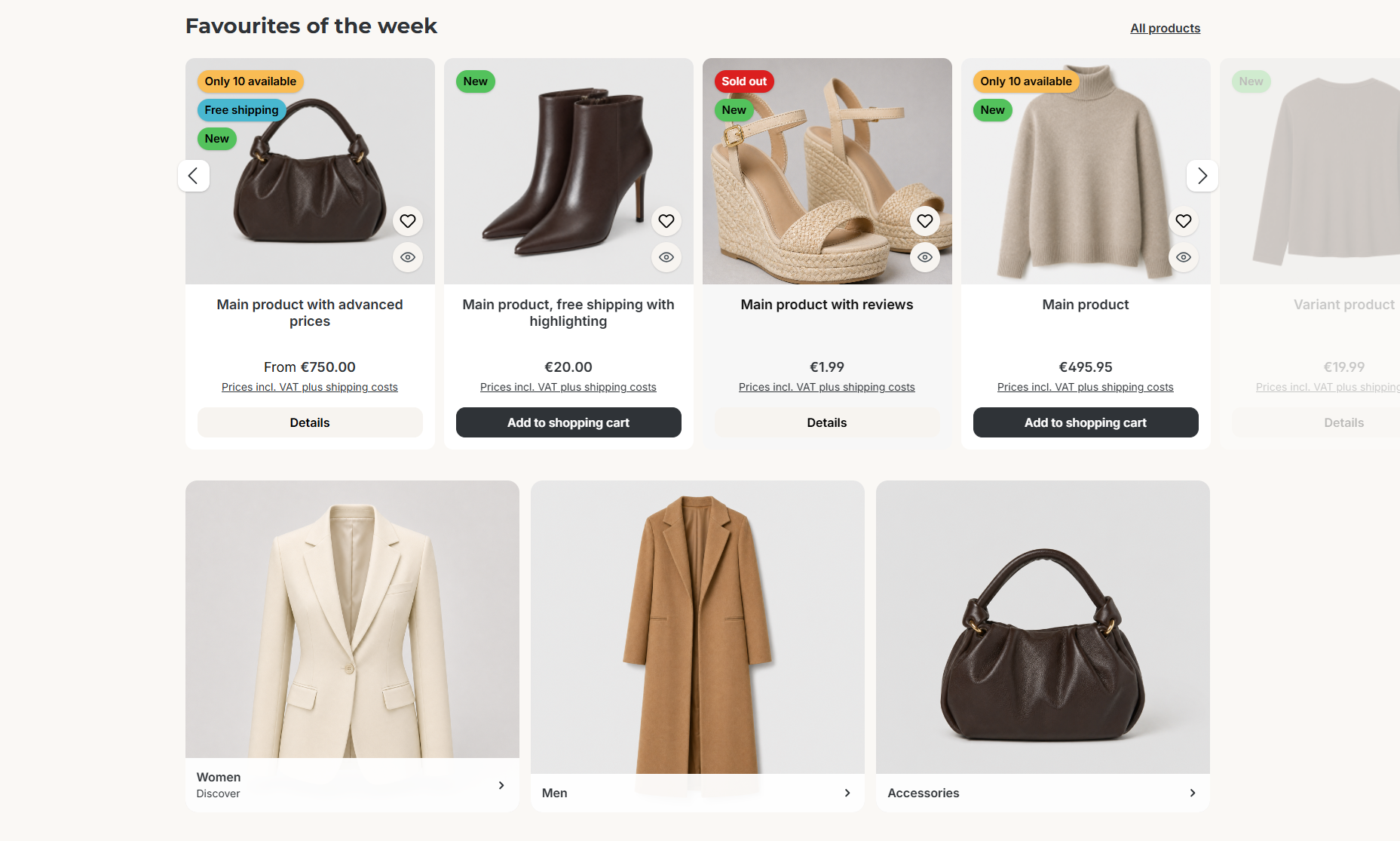
Product slider and category teasers in the ThemeWare® showcase shop
Changes in detail
Individual CSS and JavaScript code: Input errors with the <style> or <script> tag are now corrected automatically
ThemeWare® now automatically corrects typical input errors in the fields "Individual CSS code" and "Individual JavaScript code": a forgotten <script> tag is added, and an unnecessary <style> tag is no longer output twice.
jQuery: Now loaded in version 3.7.1, further versions can be selected Feature-Request
Based on a feature request, ThemeWare® now loads jQuery in the current version 3.7.1 instead of 3.5.1. You don't need to do anything: if "Load jQuery" is set to "yes", the new version is loaded automatically.
Under tab "Others" => area "Advanced settings" => section "jQuery" => "Load jQuery" you can now also choose the version yourself:
- "yes (recommended version)": currently jQuery 3.7.1
- "yes (jQuery 4.0.0)": the latest major version
- "yes (jQuery 3.6.4, compatibility)" and "yes (jQuery 3.5.1, compatibility)": only if a third-party extension requires an older version
Product specifications (in the buy box): The main category of the product can now be shown as a link Feature-Request
Based on a feature request, besides the product number and the manufacturer, the product specifications in the buy box can now also show the category of the product, linked to the category page. It shows the main category in the current sales channel, so there is nothing extra to maintain. Without a main category, Shopware uses an assigned category from the navigation.
You enable it under Tab "Product pages" => Block "Product specifications (in the buy box)" => Section "Section: General information" => "Show category". You can change the label "Category:" via the snippet twt.detail.categoryLabel.
Product pages: A price label such as "Our online price" can now be shown above the price, also with its own text for offers Feature-Request
Based on a feature request, a short text can now be shown above the price on the product page, e.g. "Our online price". You maintain the text via a snippet for all products or via a custom field per product. For products with a list price you can choose a text of their own, e.g. "Winter sale", or show the label only for these products.

Price label from snippet, own snippet with list price and custom field
You can find the settings under Tab "Product pages" => Block "Buy box" => Section "Price label". No price label is shown with tiered prices. Learn more in the article Price label.
Shopware Commercial: Improved button for adding to shopping lists in the product box
If you use Shopware Commercial with shopping lists, the product box shows a button for adding to a shopping list instead of the wishlist button for simple products. The wishlist can then be reached via the menu of this button. The button now sits in the same place as the wishlist button and takes on its colours, size and shadow.
You set the position as usual for the wishlist button (Listing pages => Product box => Wishlist button => Position).
Shopware Commercial: More B2B pages such as quick order, budgets and organisation units now use the ThemeWare® CMS styling
If you use Shopware Commercial, more B2B pages in the customer account now appear in the same layout as the other account pages. New are, among others, the quick order, the organisation units, the budgets, the subscriptions and the detail view of a quote.
The styling applies when "Load ThemeWare® CMS styling (B2B Components)" is active (Pages => Shopware B2B Components => Load ThemeWare® CMS styling (B2B Components)).
Sticky top navigation: Now slides in and out smoothly and only appears once the top navigation has been scrolled out of view
The sticky top navigation now slides in and out more smoothly. It only appears once the top navigation has been scrolled completely out of view, so there is never a second navigation visible. When scrolling up, it blends seamlessly into the top navigation.
It stays visible as long as the mouse is on the navigation or an open flyout, or while you use the navigation with the keyboard. If "reduce motion" is enabled on the device, the animations are left out.
You find the settings under tab "Header" => area "Sticky top navigation (Basic headers: 'Header 1' and 'Header 2')" => section "Basic configuration". A larger "Scroll top" value makes the sticky top navigation appear later.
Sticky top navigation: Improved keyboard use, the focus is kept and focused elements are no longer covered
Keyboard users now keep the focus when the cart moves into the sticky top navigation while scrolling. When navigating with the Tab key, focused elements stay visible and no longer end up below the fixed navigation.
Top navigation flyout: The category image can now be hidden Feature-Request
Based on a feature request, the category image in the flyout of the top navigation can now be hidden. If a category has a display image, it appears in the flyout next to the subcategories. When it is hidden, the subcategories use the full width of the flyout.
You set this under Tab "Header" => Block "Top navigation flyout" => Section "Basic configuration" => "Show category image". The setting applies to "ThemeWare® Flyout" and to "ThemeWare® Flyout with teasers" if the category has no teasers of its own.
Preparation for Shopware 6.8: The theme now recognises pages using the new Shopware method
With 6.8, Shopware removes the Twig variables controllerName and controllerAction, the replacement is activeRoute. ThemeWare® already adopts this change, nothing changes in your shop.
Bugfix: Details in the quotes and shopping lists of Shopware Commercial are now aligned like in the Shopware default
In the detail view of a quote and a shopping list, labels such as "Created at" are now left-aligned and bold, like in the Shopware default.
Bugfix: The x icon, e.g. in the search button of the flyout search, is now also shown before the cookie consent
As long as visitors had not agreed to the cookies yet, the x icon was missing in several places, e.g. in the open search button of the flyout search. It is now always shown.
Bugfix: The custom field "Manufacturer information" on manufacturers is now also available in the Cloud Edition Cloud
In the Cloud Edition, the custom field "Manufacturer information" for the GPSR details was missing on manufacturers, only "Responsible person" was created. With the update it is available. Until then, the manufacturer information could be maintained via the custom field of the same name on the product.
Bugfix: The fade at the end of a long top navigation in the full-width sticky header now sits directly at the navigation
If the top navigation in the "Full-width sticky header" does not fully fit into the row, a fade hides its end. This fade used to sit at the right edge of the whole header, also above the top bar and USP bar. It now sits directly at the end of the top navigation.
Bugfix: The entries for the utilities package in the ThemeWare® Hub dashboard now lead to the matching guides Pro
In the ThemeWare® Hub dashboard, the task "Get the free ThemeWare® Utilities package" lists the contents of the package. In certain cases, clicking these entries only led to the start page of the administration. Import plugin, Shopping Experience graphics, logo set and Customising Plugin & App now lead to the matching article in the knowledge base or the documentation. The PDF and step-by-step instructions are part of the package and are therefore not linked.
Bugfix: The top bar in header 2.1 now has straight corners at full width
The top bar in "Header 2.1" got rounded corners even when it spans the full width. The rounding is now only used in the basic layout "Boxed".
Notes
jQuery: Please check the setting "Load jQuery" after the update
ThemeWare® no longer requires jQuery. New installations therefore no longer load jQuery by default, which saves loading time.
- Pro Edition: Existing shops keep loading jQuery. If you never changed the setting, it is set to "yes (recommended version)" automatically during the update.
- Cloud Edition: If you never changed the setting, jQuery is no longer loaded after the update.
Check whether a third-party extension in your shop requires jQuery and enable it in that case under tab "Others" => area "Advanced settings" => section "jQuery" => "Load jQuery". If no extension requires jQuery, you can set it to "no" and save loading time.
Note: If the "Sticky top navigation", the fixed header on phones or the "Shopping Experiences Header" behave differently after the update, switch tab "Others" => area "Compatibility (HC-Architecture®)" => section "Header" => "Header scripts (sticky navigation, Shopping Experiences Header)" to "ThemeWare® (jQuery version, deprecated)". This loads the previous version of the scripts, jQuery is activated automatically for it. In that case, please send us a feature request with a short description so that we can correct the behavior.
Preparation for Shopware 6.8: Switch the body classes is-ctl-* and is-act-* in your own CSS
With 6.8, the body classes is-ctl-* and is-act-* will also be removed. If you use your own CSS with them, switch it to is-active-route-*. Shopware already outputs these classes today.
/* before */
.is-ctl-checkout.is-act-cartpage { }

/* now */
.is-active-route-frontend-checkout-cart-page { }