
ThemeWare® 5 brought many new design options. They let you design shops that used to require your own CSS. In this example we show a product slider and category teasers from the home page of our showcase shop and how to rebuild them.
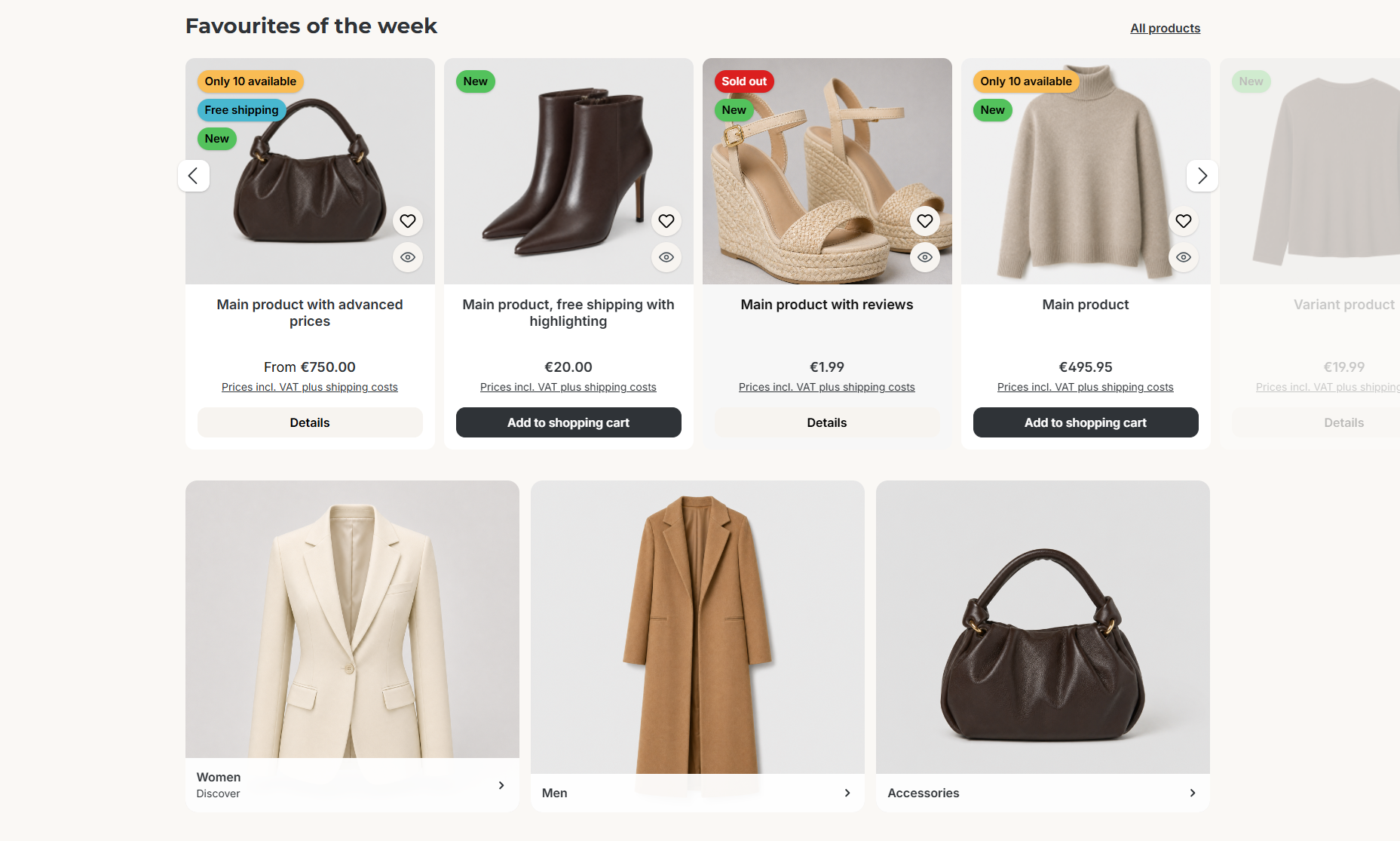
Product slider and category teasers in the ThemeWare® showcase shop
What's inside
- Product slider with overflow (since 5.1): The products reach beyond the content area, the next product is cut off at the edge and invites you to keep browsing.
- Spacing and navigation arrows in the product slider (since 5.3.1): own spacing between the products, arrows with a shadow at the height of the product images.
- Column gap per CMS block (since 5.0): The category teasers sit next to each other with their own gap.
- Product box with a borderless image, wishlist and quickview button on the image and product badges.
How to rebuild it
1. Basic layout
In the tab "Layout":
- Block "Layout" => Border radius:
12 - Block "Typography" => Fonttype (text): Inter, Fonttype (headlines): Montserrat
- Block "Main colours" => Background colour: a warm tone, here
#faf8f5 - Block "E-Commerce" => Buy button and Details button: own colours, here
#2f3337and#f7f4f0
2. Product box
In the tab "Listing pages" => block "Product box":
- Section "Product image" => Layout type: "Full-width (borderless)", Background colour:
#f4efe9 - Section "Icon buttons (Wishlist / Quickview button)" => Background colour:
#f7f4f0
You enable the quickview button in the tab "Others" => block "Beta" => Quickview. Learn more in the article Quickview. You define which badges appear in the product badges, the picture shows New, Free shipping, Stock and Sold out.
3. Product slider
In the shopping experience, first add the CMS block "Two columns, 9-3": the headline on the left, the link "All products" on the right. A product slider follows below.
In the tab "Shopping Experiences" => block "Product slider (Category 'Commerce')":
- Section "Design" => Layout type: "Overflow"
- Section "Basic configuration" => Cropped products: "Dimmed"
- Section "Basic configuration" => Spacing between products:
12 - Section "Basic configuration" => Vertical position (Navigation arrows): "30 %"
The arrows themselves come from the global slider settings in the tab "Content" => block "Sliders" => section "Arrow navigation":
- Layout type: "Square/Circle"
- Shadow: "subtle"
4. Category teasers
Add the CMS block "Category teaser (Three columns)" to the shopping experience and choose a category for each column. In the block settings, you set the column gap under "Responsive block layout", here 15px.
Important: The block configuration is only available in the ThemeWare® Pro Edition.
More design examples
Do you like this kind of article? Then feel free to send us your feedback via the ThemeWare® Service Portal. If the format is well received, we will show more examples, e.g. for the product page, header or checkout.